Why ClawGate

Your Agent Needs Access to Your Machine

You're running AI on an isolated machine. Smart. But now it needs your files, your repos, your tools...

NFS / SMB Mount

Full filesystem access. Agent gets pwned โ†’ you get pwned.

SSH + rsync

Credentials stored on agent machine. Same problem.

Manual Copy

Tedious. Breaks flow. Doesn't scale.

Cloud Sync

Your code on someone else's servers.

None of these assume the agent might be compromised. But it might be - prompt injection is real.


Architecture

Capability-Based Access

Grant specific paths, specific tools, specific operations, for a specific time. Nothing more.

Zero Trust

Assumes the agent machine is compromised. Because it might be.

Least Privilege

Grant ~/projects/app/** not "everything".

Time-Bounded

Tokens expire. 1 hour, 24 hours, 7 days - you choose.

Revocable

Revoke tokens instantly. Dead credential, even if the agent still holds it.

Full Audit

Every operation logged with path, tool, timestamp, and result.
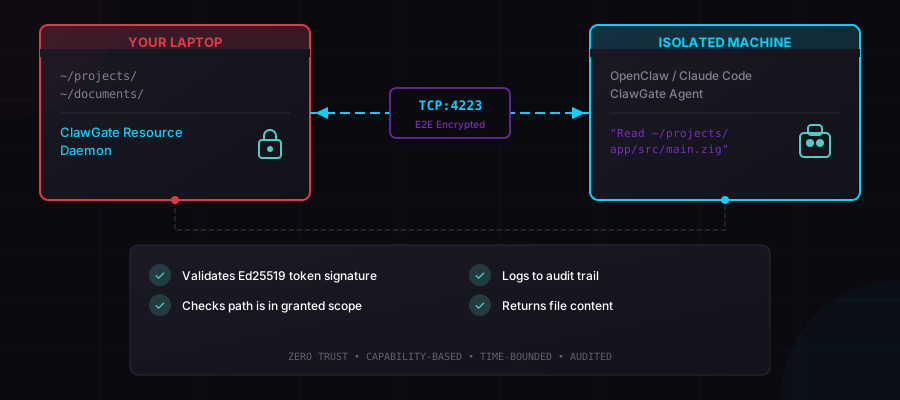
ClawGate Architecture Diagram

Getting Started

Up and Running in 60 Seconds

1

Generate Keys & Grant Access

On your primary machine (laptop / workstation)
clawgate keygen
clawgate grant --read "~/projects/**" --ttl 24h > token.txt
# Or with git access:
clawgate grant --git "~/projects/**" --ttl 24h > token.txt
# Or grant a registered tool:
clawgate grant --tool web-fetch --ttl 4h > token.txt
2

Copy to Agent Machine

Send the token and your public key to the isolated machine
scp ~/.clawgate/keys/public.key token.txt agent-machine:
3

Start Agent

On the isolated machine (Mac Mini, VPS, container)
mkdir -p ~/.clawgate/keys
mv public.key ~/.clawgate/keys/
clawgate token add "$(cat token.txt)"
clawgate --mode agent
4

Connect

Back on your primary machine
clawgate --mode resource --connect <agent-ip>:53280

Steps 1โ€“3 are one-time setup. After that, just create new tokens anytime. Tokens hot-reload - no restart needed.


Defense in Depth

Security Model

15 layers of protection. Assume breach at every layer.

LayerProtection
TransportX25519 + XChaCha20-Poly1305 end-to-end encryption
Forward SecrecyFresh ephemeral keys per session
AuthenticationEd25519 signed JWT capability tokens
AuthorizationPer-request path and tool scope validation
RevocationResource-side revocation list, checked every request
Path SafetyCanonicalization, symlink rejection, traversal protection
Forbidden Paths~/.ssh, ~/.aws, ~/.gnupg - hardcoded, ungrantable
Git AllowlistsThree-tier command allowlists, blocked flags (-c, --exec)
Argument ValidationPer-tool allowlist/denylist for command flags
Tool Path ValidationAll tool arguments scanned for paths, validated against per-tool scope
No Shell ExecutionTools run via direct argv, no shell interpolation
Output LimitsPer-tool configurable output truncation
Symlink RejectionAll symlinks unconditionally rejected
Time LimitsTokens expire, limiting blast radius
Audit TrailEvery operation logged locally with cryptographic proof

Features

What You Get

Custom Tool Proxy

Register any CLI tool. The agent invokes it remotely with argument validation and output limits.

Git Operations

Three permission tiers: read-only, write, full. Command allowlists block dangerous flags.

Token Revocation

Revoke tokens before they expire. Resource-side enforcement - the agent doesn't need to be contacted.

Skill Generation

Auto-generates agent-readable skill files from the tool registry. Agents discover tools automatically.

E2E Encryption

X25519 key exchange + XChaCha20-Poly1305. Forward secrecy per session.

Hot Token Reload

Add tokens while running. No restarts. No reconnects.

Persistent Audit Trail

Every operation logged to ~/.clawgate/logs/audit.log with full detail.

Pure Zig, Zero Deps

Single binary. No runtime. No supply chain risk. Minimal latency.

MCP + Skill Files

Native MCP server for tool-based agents. Drop-in skill files for CLI agents like OpenClaw.


Agent Integration

Works With Any Agent

Skill files for CLI-based agents. MCP server for tool-based agents.

OpenClaw

Skill file (CLI)

Claude Code

Skill file + MCP

Cursor

MCP server

OpenCode

Skill file + MCP

Codex

Skill file + MCP


See It in Action

Real Usage

Telegram conversations with OpenClaw, followed by the CLI operations the agent calls under the hood.

Document Analysis via Telegram

๐Ÿค–
Echo128 ยท OpenClaw
Hey Echo128! Here a new token:
eyJhbGciOiJFZDI1NTE5...

Can you check the doc: /home/m64/Documents/test.md
How big is it, what is it about?
Added the token!

File info:
โ€ข Size: 6,932 bytes (~7KB)
โ€ข Modified: 2025-12-28

What it's about:
A blog post about running OpenAI Whisper on AMD Radeon 890M with ROCm!

Great writeup!
๐Ÿ“‹ Audit Log - your machine
2026-02-03T22:23:26Z AUDIT req=req_5af1a082.. op=stat
path=/home/m64/Documents/test.md success=true
2026-02-03T22:23:26Z AUDIT req=req_784b20f4.. op=read
path=/home/m64/Documents/test.md success=true

Project Exploration via Telegram

๐Ÿค–
Echo128 ยท OpenClaw
Hey Echo! Can you read my /home/m64/space/ai/clawgate please! What's in there?
Show me the first 5 lines of the LICENSE file?
Here's your ClawGate project!

src/ docs/ skills/ testing/ scripts/
build.zig README.md LICENSE ...


LICENSE (first 5 lines):
MIT License
Copyright (c) 2026 M64
Permission is hereby granted...


Want me to dive into any specific file?
๐Ÿ“‹ Audit Log - your machine
2026-02-08T02:36:28Z AUDIT req=req_d1f050.. op=list
path=/home/m64/space/ai/clawgate success=true
2026-02-08T02:36:28Z AUDIT req=req_31ecdc.. op=read
path=/home/m64/space/ai/clawgate/LICENSE success=true

File Access

Primary Machine
$ clawgate grant --read ~/projects/webapp/** --ttl 24h
eyJhbGciOiJFZDI1NTE5IiwidHlwIjoiSldUIn0.eyJpc3MiOi...
Agent Machine
$ clawgate cat ~/projects/webapp/src/main.zig
const std = @import("std");
const server = @import("server.zig");
pub fn main() !void {
    var gpa: std.heap.GeneralPurposeAllocator(.{}) = .init;
    ...
๐Ÿ“‹ Audit Log
2026-02-08T14:32:18Z AUDIT req=req_a7c3f2e1 op=read
path=/home/mario/projects/webapp/src/main.zig success=true

Git Operations

Agent Machine
$ clawgate git ~/projects/webapp log --oneline -5
a8e3ba1 Merge pull request #3 from v0.3.0/custom-tools
4b0698d v0.3.0 - custom tools
c92a1f8 Add argument validation for tool proxy
7d3e5b2 Implement tool registry with JSON persistence
1a4f9c0 Initial commit
๐Ÿ“‹ Audit Log
2026-02-08T14:33:05Z AUDIT req=req_e851c200 op=git
path=/home/mario/projects/webapp success=true

Custom Tools

Primary Machine
$ clawgate tool register calc \
  --command "bc -l" --allow-args "-q" \
  --description "Calculator"
Tool registered
$ clawgate grant --tool calc --ttl 4h
eyJhbGciOiJFZDI1NTE5IiwidHlwIjoiSldUIn0.eyJpc3MiOi...
Agent Machine
$ echo "scale=2; 22/7" | clawgate tool calc
3.14
๐Ÿ“‹ Audit Log
2026-02-08T14:35:12Z AUDIT req=req_9d47c18f op=tool
path=calc success=true

Token Handoff + Security

๐Ÿค–
Agent ยท Telegram
eyJhbGciOiJFZDI1NTE5...
Token added: cg_9ae7ce62. I now have read access to ~/projects/webapp/**. Expires in 24h.
Agent Machine - access denied
$ clawgate cat ~/.ssh/id_rsa
Error: ACCESS_DENIED: Forbidden path

$ clawgate git ~/projects/webapp push origin main
Error: SCOPE_VIOLATION: Insufficient git permissions
๐Ÿ“‹ Audit Log
req=req_552621fd op=read path=~/.ssh/id_rsa error=ACCESS_DENIED
req=req_79565e1c op=git path=~/projects/webapp error=SCOPE_VIOLATION

Ready to Secure Your AI Agent?

Stop exposing your machine. Start using capability-based access.

View on GitHub Docs โ† Back to Overview